What does it look like when AI is embedded in a workflow versus bolted on?
Using AI and embedding it in a workflow are not the same milestone. Here's the structural difference, with 2026 data on how much of that gap still remains.
A bolted-on AI tool sits next to a workflow. Someone opens it when they remember to, copies the output back into whatever system the workflow already runs on, and the workflow itself never changes shape. An embedded AI tool sits inside the workflow. It has a defined place where it acts, its output flows straight into the next step without someone retyping it, and the workflow was actually redesigned around having it there. Both can technically be "using AI." Only one of them changes what the work looks like.
The tell isn't whether AI is used, it's whether the workflow was redrawn
Most companies aren't short on AI usage anymore. They're short on workflows that were actually redesigned to have AI inside them. BCG's fourth annual global AI at Work survey, roughly 12,000 respondents across more than a dozen markets published in June 2026, found 74% of frontline employees now describe themselves as AI users. But only 30% of respondents say their organization has integrated AI agents into actual workflows, up from 13% a year earlier. Usage tripled the visible number. Integration is still the minority case.
Bolted on, in three specific ways
- It sits outside the system of record. Someone runs the AI step in a separate window, then manually re-enters the result into whatever tool actually tracks the work. The AI step is invisible to anyone who isn't the person doing it.
- It replaces effort, not process. The person does the same steps in the same order, just faster on one of them. Nobody redrew the workflow diagram, because nothing about the workflow's shape changed.
- It disappears if the person leaves. Nothing about how it's used is written down or owned by a role, so the practice walks out the door with whoever built the habit.
What this looks like in a real workflow
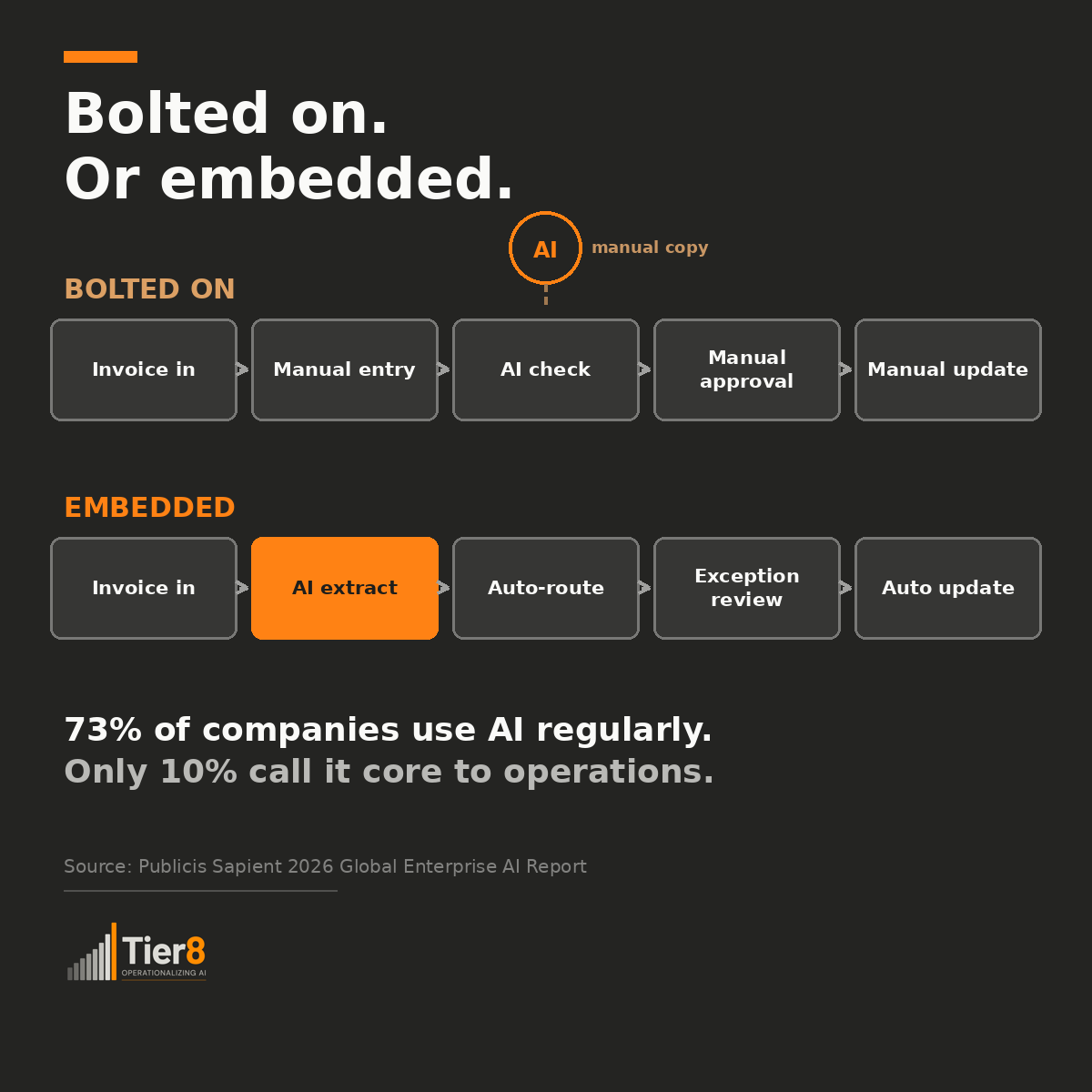
Take something as ordinary as processing a vendor invoice. Bolted on, it looks like this: an invoice arrives by email, someone keys it into the AP system by hand, someone else opens a separate AI tool to check it for duplicates or anomalies and jots down what they find, an approver manually checks the line items against the purchase order, and once it's approved, someone updates a tracking spreadsheet by hand. Five steps, one AI tool wedged in as a side errand.
Embedded, the same process looks structurally different: the invoice is ingested automatically, AI extracts the line items directly into the system of record and flags anything unusual inline, flagged exceptions route automatically to the right approver while clean invoices proceed on their own, the approver only ever sees the exceptions along with the reasoning behind the flag, and payment and tracking update automatically once approved. Same five steps, but the workflow itself was rebuilt around what AI can now catch and route, not just sped up at one point in the middle.
What the 2026 data says about how far this has actually gone
Publicis Sapient's 2026 Global Enterprise AI Report, 1,550 AI decision-makers at companies with 500 or more employees and $100 million or more in revenue, surveyed in April and May 2026, found 73% of respondents say AI is used regularly or across most business processes.
Only 10% describe AI as core to how the organization actually operates. That 63-point gap between "regularly used" and "core" is close to the exact shape of bolted-on versus embedded: most companies have crossed the usage threshold, and a much smaller group has crossed the redesign threshold.
The same survey found 42% believe their organization isn't structurally built to capture AI's value at all, and 22% point to organizational design, not the technology, as the primary constraint.
The steps that used to be off-limits for redesign
Publicis Sapient 2026 Global Enterprise AI Report
In automation and transformation work I did before AI, redesign had a hard ceiling. You could rebuild a workflow around a new tool only if the step being automated was repeatable, followed a fixed set of rules, and ran on structured data, a number in a field, a status in a dropdown. Any step that required judgment, weighing context nobody had written into a rule, or reading something unstructured, an email, a contract clause, a customer's free-text complaint, stayed manual by default, because there wasn't a tool that could take it on. Redesign efforts drew a line at that point: automate everything up to the judgment call, then hand back to a person, and leave the rest of the workflow exactly as it was.
AI erases that ceiling. It can take on the decision step and the unstructured input, the two things that used to mark exactly where redesign had to stop. That's a real opportunity to rebuild a workflow end to end instead of automating around the edges of it. But a lot of teams are still redesigning like the old ceiling is still there, treating AI as a faster version of the tool that used to hit that wall, rather than asking what the whole workflow could look like now that the wall is gone. That's most of the gap between the exception-routing invoice example above and the version where AI just checks for anomalies on the side.
Does replacing one manual step count as embedding it?
Not exactly. Speeding up a single step is a legitimate first move, and it's usually how embedding starts. But a faster step inside an unchanged workflow is still a bolted-on tool, just a well-used one. Embedding requires someone to ask what the rest of the workflow should look like now that this step doesn't work the way it used to, and then actually change the steps before and after it. Skipping that question is exactly how a company ends up with high AI usage and a workflow diagram that hasn't been updated in over a year.
Three questions that tell you which one you actually have
- If the AI step disappeared tomorrow, would the workflow break, or would someone just go back to doing that one step by hand?
- Does the output flow into the next step automatically, or does a person manually copy or retype it into the system of record?
- Could someone other than the person who set it up explain, right now, where in the workflow AI is supposed to act?
If any of these is hard to answer with confidence, the workflow itself was never redesigned, whatever the usage numbers say.
Where this fits into the bigger picture
Integration into Work is one of the five pillars the RAISE OS™ AI Maturity Assessment measures separately from raw usage, precisely because a company can clear the usage bar and still have every workflow built around AI as an add-on rather than a structural part of the process. Personal AI use and organizational integration are already two different measurements, and embedding goes a layer deeper than integration alone: it's whether the specific workflow itself got redrawn, not just whether the organization adopted the tool.
Find out where your organization actually stands
Turn this into a sequenced transformation plan.
Founding Partner Program: five organizations, no cost
Apply for the Founding Partner Program →